Our stories of building a group planning tool.
Index
(Newest to oldest)
- New Feature: Map View for Events
- Let’s Review: Multi-layered Calendars
- Why group event planning.
- Launch in 2020
Full articles
(Newest to oldest)
-

New Feature: Map View for Events
Problem: place suggestions have no relative position
Our approach thus far for the group event planning process has revolved around suggestions and voting — reduced to a list. The system of suggestions and votes captures much of the essence of what we do verbally and textually.

Knowing the groups’ votes is key information for a host to make an informed decision — but it’s not all the information. Sometimes it’s good enough because you have places mentally mapped or a place is so good or reputable that it makes the decision.
Lists are good, but not good enough
Sometimes you want more information: where are these places? where are they relative to me and the group? where are they relative to our previous place and the next place? The general gap is lists lack relative position in time and space. And the answer is a different view — for places, a map view.
Lists lack relative position in time and space
Solution: map view
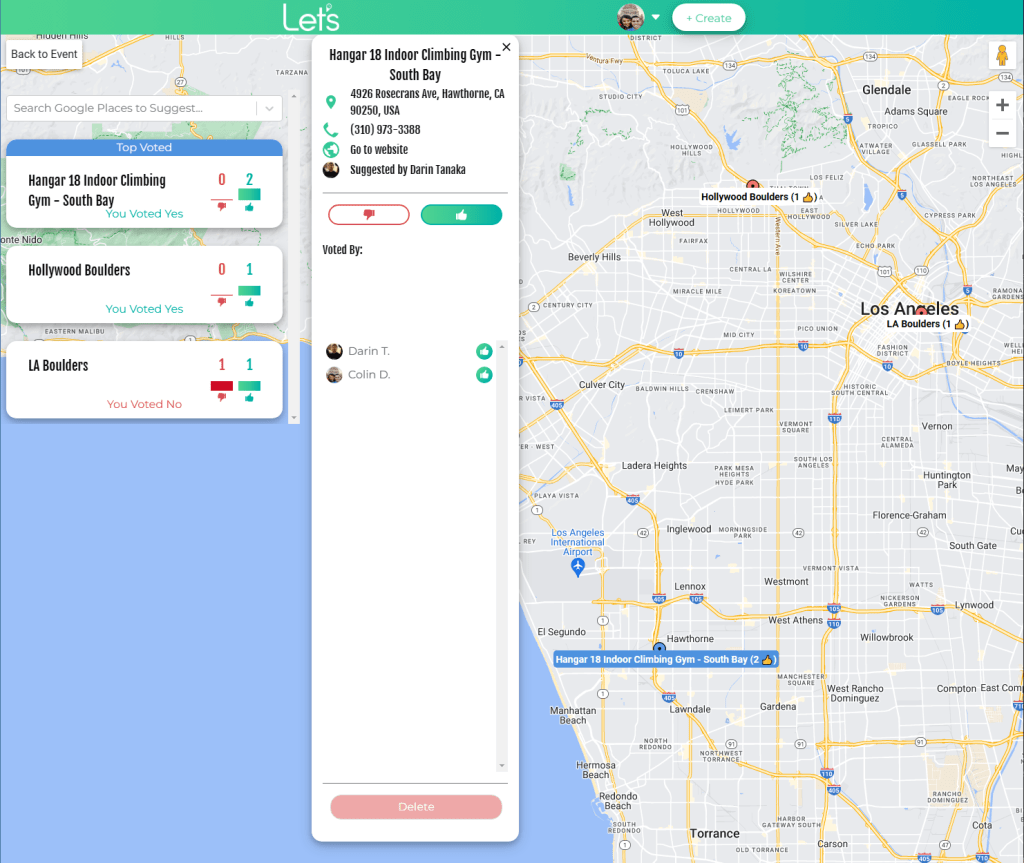
We added a map view to Let’s events. Now everyone can view all locations on a map and vote on them there. Combined with the existing system of suggestions, the event map is a simple solution and nicely handles the problems of freeform suggestions, freeform responses, and relative locations in group chats — Problem 1, Problem 2, and Problem 3 below.
Analysis: comparing to group chat
While we are confident that our intuition of maps is useful, let’s do a qualitative comparison to the current common solution.
Use-case: agreeing on a place for dinner
Let’s consider a use-case of planning a group dinner. And let’s focus on agreeing on a place, as that is where maps are involved.
The common solution is sharing places in group chats.
The current common solution is sharing places in group chats or emails.
Problem 1: chats are high effort when viewing places on map

Chat messages are freeform. At worst, place suggestions are names of places or screen shots. At best, place suggestions are links – to maps or the venue itself. And often they are scattered throughout other messages. (What a mess!)
For simplicity, let’s assume one person shares links to 3 places in back-to-back messages. Even in this best case, it’s high effort to view them on a map. To view and evaluate these places, purely based on location, you would
- Click link 1, view the map, go back to the chat
- Click link 2, view the map, go back to the chat
- Click link 3, view the map, go back to the chat
- Write your responses in free form
Problem 2: voting in chat is high effort

You can’t easily vote. Sure you could say “Sounds good”, but which place are you talking about? It takes effort to repeat each place and your opinion, eg, “Saffron Patch is out of the way since we are going downtown after. I’m good with Batouqi and TOLI because they are on the way and both fun spots.” Then the host has to mentally process that and mentally tally the votes. If you’ve been the host seeking consensus, you know this can be overwhelming.
On the bright side, the benefit of this high effort medium is that through laziness, it forces efficiency. So, we just say what we like most “Let’s do TOLI.” So instead of querying everyone’s opinion, we lazily make a quick decision. But it may not be the best decision.
The suggestions (links) are lost in the chat messages above — because of lack of systemization, so you only get some responses. Let’s solves this with suggestions and voting.
Problem 3: view one place at a time
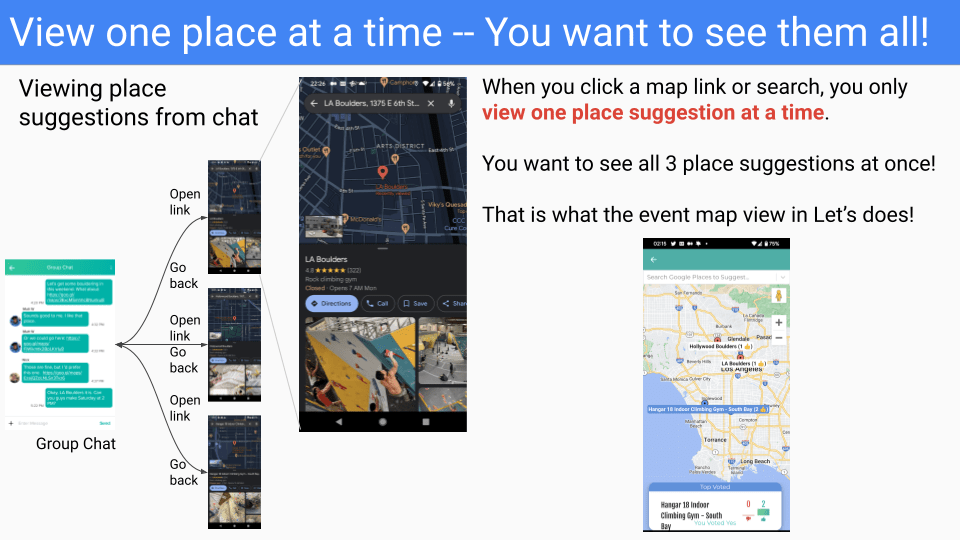
When viewing places, you want to know: “where are they?” When viewing individually, sometimes maps services show locations as recently viewed — but not for long and they also show you everything else, so it can be hard to focus. You want to focus on the options.
Ideally, you also want to know where the options are relative to you — and relative to where we will be before that and where we will be after that.
Summary: a map view for events enables group planning for places
The map view in Let’s events enables everyone to view all locations on a map and vote on them there. Map views are a familiar and thus intuitive interface. In group planning for places, this is ideal.
This system of suggestions and voting on a map is simple and nicely handles the problems of freeform suggestions, freeform responses, and relative locations (Problem 1, Problem 2, and Problem 3 above) .
This simple innovation is a product differentiator!
As simple as this is, there is no other straight-forward way to collaboratively suggest places on a map and vote on them.

We have enjoyed using the map view and we hope you do, too. Next time you are deciding on a place with a group, try an event in Let’s!
-
Let’s Review: Multi-layered Calendars
Note from the author
Background & Relevance
Julian wrote a fun and insightful article: multi-layered calendars.
The article approaches calendars with an open mind, proposing extensions to its functionality that better capture reality and serve its users.
Let’s is a service for group event planning that my team is working on. We take a similar open-minded approach and also try to create a system that better captures reality and serves its users — for group event planning.
About Let’s
Let’s breaks down group event planning to events, groups, and trips.
- Events are a single time and place. Even this can be difficult to coordinate with a group of people: aligning everyone’s schedules and preferences to get agreement on time and place — and then communicating it all.
- Groups are recurring events with a common group of people. The complexity here is when instances of the event must be changed. Then you are in the case of an event, trying to gain agreement on time. and place.
- Trips are the holy grail of group planning — finding available date ranges, suggesting activities, managing resources, creating schedules, making tickets and reservations, and executing it all.
Let’s approaches planning from a collaborative perspective with suggestions, votes, and messages. This applies in multiple dimensions, commonly time and place.
For both dimensions, suggestions reduce to a list view, which is where we started.
We have found that other views can provide more information to make decisions. For places, we have map views, so you can see relative locations on a map. (This is handy when weighing multiple place suggestions.)

For times, we will be adding calendar views — hence the direct relevance to the article. I wrote my responses below.
Formatting
Topic summary
- [Julian] “Excerpt / highlight from original article“
- [Colin] My comment. I’m Colin 🙂
Review
Calendars help us optimize time
- [Julian] “Time devices like calendars help us to plan and optimize how we spend our time.“
- [Colin] I like this abstract approach. Time devices like calendars are just one of many tools we use to plan.
Little technological focus –> Let’s agrees
- [Julian] “You would expect technologists and entrepreneurs to be intensely focused on perfecting such a magical time travel device, but surprisingly, that has not been the case.”
- [Colin] Overall, I agree! The planning process has not changed much. We think our current tools (calendars, chats, and spreadsheets) are mediocre for group planning — we get it done, but it’s a pain. Let’s aims to change the group planning process.
- [Colin] Also, let’s credit the efforts of many calendar-like services: cal.com, Fantastical, TidyCal, Calendly, SavvyCal, PlanHarmony, Doodle, and many more.
- [Colin] A fun news update. A related product called IRL came along and got $170M in Series C funding with a $1.2B valuation. We took it as good news that the market of event planning was real. However, we recently learned that [IRL] raised $200M from SoftBank and others is shutting down because 95% of its users were fake. This reduces support that a market exists for group event planning, but we strongly believe it does as personal interviews continue to validate the need.
Most digital calendars are similar to static, physical calendars
- [Julian] “Our digital calendars turned out to be just marginally better than their pen and paper predecessors. And since their release, neither Outlook nor Google Calendar have really changed in any meaningful way.”
- [Colin] A pretty harsh critique on digital calendars. High level, I agree — that digital and physical calendars look similar.
- [Colin] I think this is okay and even good because there is a familiarity (month view). Applying UX Law 6: Jakob’s Law, means that digital solutions should resemble their physical predecessors. However, the magic is that digital solutions can have multiple views and other interactive elements.
- [Colin] While they mostly look the same and have little functionality changes, digital calendars have added some critical improvements:
- time zones — automatically handled when traveling
- views (3 day, week, month) — like zooming in/out
- attachments — centralizes tickets and reservations
- syncing across devices — we expect it, but it’s critical
- calendar sharing — much potential, but under-utilized
- [Colin] Calendar sharing is rarely used — and it has so much potential. You can plan better with visibility into someone’s calendar — instead of asking them. This is why it’s easier to schedule meetings at work, than at home. (Though at large companies I’ve worked at, I had permissions issues and had to request access and sometimes didn’t get it.) Personal calendar sharing is lacking. SavvyCal, TidyCal, and Calendly are on the right track, but (1) require manual overhead in setting up availability (2) are mainly for 1-on-1 arrangements (3) don’t have much negotiation for location. So, we think Let’s has value-add here in group scheduling.
Concept: heavy overlap of notes, email, and tasks.
- [Julian] “The fact that we use four distinct tools suggests that note-taking, email, task management, and time management are four distinct activities. But when you look closer, you’ll realize that these activities are actually not that clear-cut. In fact, they all heavily overlap. Notes are just emails to your future self. Emails are just tasks.”
- [Colin] I love this and many people on the Twitter thread agree. I realized the same thing (over and over) when taking notes, which generate tasks, and those tasks would be emailed out.
- [Colin] My colleague would say “[you can assign work, but] if you don’t schedule it, it won’t happen.”
- [Colin] While in concept, notes -> tasks <-> emails, in practice, with existing project management tools, this is not so simple. That is, I have projects and projects have features, multiple features have dependencies, features have versions. So, generating tasks that integrate with existing project management systems (Azure DevOps, Jira, etc.) may not be that straightforward.
- [Colin] Still, the concept of notes/emails -> tasks and queuing them to be scheduled — is a dream. Then, we could distribute tasks onto calendars. Managers often want predictions on completion times. This process would facilitate that.
Concept: tasks are a calendar layer

Source: multi-layered calendars - [Colin] I really like the concept of capturing surrounding (dependent and resultant) tasks and their associated times. The example of travel time is great. Currently, it’s either in your head or you manually block it out. If the meeting moves, you have to manually move those blocks yourself! Sure Google Calendar tries to notify you “you should leave for X meeting” but it’s not blocked off on your calendar, so people think you’re available when you’re not. Again, great point here.
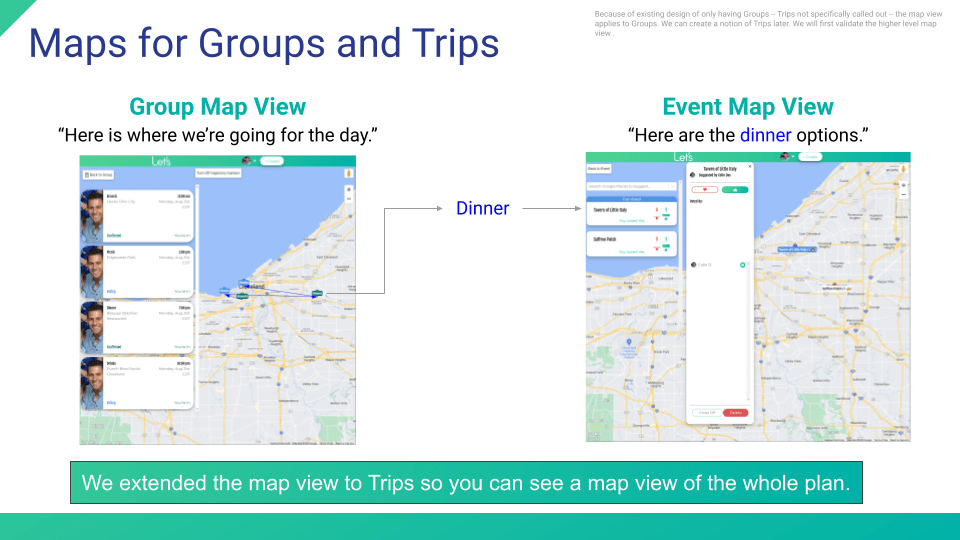
- [Colin] For Let’s trips, we hope to add modes of transportation which can help you plan better. It’s one thing to say I want to do these 4 activities today, but if they are each 2 hours apart and each take 2 hours, it may not be feasible. Calendars don’t help us with these critical logistical details, setting us up for failure. In Let’s, our first cut at this was to show a map view with straight lines of the events for the day. (Ideally, we’d add mode of transport and compute and render travel time, but it was easier to start with straight lines. Also, because events can have multiple place suggestions, for the Trip view, we select the confirmed or top-voted suggestion.) Pretty slick, huh?
Missing layer: Activities
- [Julian] “Flights, for example, should be native calendar objects with their own unique attributes to highlight key moments such as boarding times or possible delays.”
- [Colin] Cool concept. I’m on board. I want Let’s to eventually handle activity types.
Concept: integrations, eg, music, stress, sleep
- [Colin] Julian discusses a concept of a music calendar layer that shows what you were listening to at any time.
- “Most of these data layers are pretty meaningless in isolation; it’s only when we view them alongside each other that they unlock their value.”
- [Colin] Bingo. It’s difficult to see the value of each layer alone, but it’s easier to see the value together. Here’s my support: like everyone, I discover new songs and I listen to familiar songs over and over in life — and they remind me of where I was when I listened to them and who I listened to them with.
- [Colin] It would be fun to pick a song and see when I listened to it, on what trips, where I was, and who else was there. Integrating these layers would enable that. I could view it in my music library, maps, photos, calendar, or contacts.
- [Colin] Overall, I love where your head is at here. And others do too.
Closing statement
- [Julian] “These changes would not just make the calendar a stronger center of gravity in the aforementioned productivity stack, but turn into an actual tool for thought, where time serves as the scaffolding for our future plans and our memory palaces of the past.”
- [Colin] Beautiful — calendars as a tool for thought. Let’s make it happen. Let’s 🙂
Thank you, Julian, for writing this insightful article.
-
Why group event planning.
It’s a mess, but we get it done
Sure, it’s easy when it’s small. If you grow the party or increase the time, there is a lot going on and it’s not easy to align everyone. In fact, it’s often frustrating for all parties. But like I said, we get it done.
Communication paths are not centralized. Let’s adds a Group Chat for every event. It’s baked in.
There isn’t a good system, but the answer is basic: suggestions and polling.
Two dimensions: time and place
For a single event, it boils down to a decision in two dimensions: time and place. That’s what it takes to meet up, the minimum requirements. That and sharing that information clearly with all members.

At minimum, an event has two dimensions: time and place. Thanksgiving reflection
The first time I reflected on the planning process was after coming back to the Chicago area over Thanksgiving in 2016 and 4 of us were meeting up: two individuals and a couple. The couple had one person coordinating, so it was three people coordinating. For three people, we had an email thread 30 emails long to agree on a time and place.
For three people, we had an email thread 30 emails long to agree on a time and place.
Upon review, I wondered what features of a system would enable this process to be smoother and faster, to let me see more at once so I don’t have to scroll back to review previous information, something to guide us instead of plain text.
I came up with several features
- Time Suggestions
- Place Suggestions
- Voting on Suggestions (positive votes and negative votes)
- Group chat
- Comments on Suggestions
- For Times, suggest days, then select times.
- Set availability and unavailability
While this list of features covered that use-case and many other cases, it’s quite a list, and “Ideas are cheap. Execution is expensive.”
We decided to proceed incrementally with a system of a few of those features: time suggestions, place suggestions, voting (positive and negative), and a group chat. Regarding execution, we still have yet to implement and integrate those remaining three features, but we are getting there.
Today’s Tools
I’ve asked hundreds of people: what tools do you use to plan events? To plan events, people predominantly use group chats and calendar events. I, too, use those tools. So I was in a good position to reflect on them.
To plan events, people predominantly use group chats and calendar events.
Group chats can be fun, but when you are trying to coordinate, they can be frustratingly inefficient. While there is fun chatter, it can be distracting and make it hard to sort through information when you need it. The serialized format also seems silly: asking if a time is okay and reading the replies of “yes”, “yes”, “yes”, “no” (better hope no one messages in between), is inefficient — and there are many notifications.
Overall, the discussion offers flexibility, but it’s inefficient. Another quiet benefit of a group chat is you know where it is — right there in your messages. (But good like finding the info when you need it.)
Calendar events (Outlook, Google, Facebook or similar) are the opposite of Group Chats: efficient, but with no discussion. An executive decision with the choice of “In” or “Out” gets you a fast and clear answer. However, there is no room for discussion or suggestions. Calendar events do have the handy feature of being in your calendar with timely notifications (that you can set: if you want a day’s notice, add that notification).
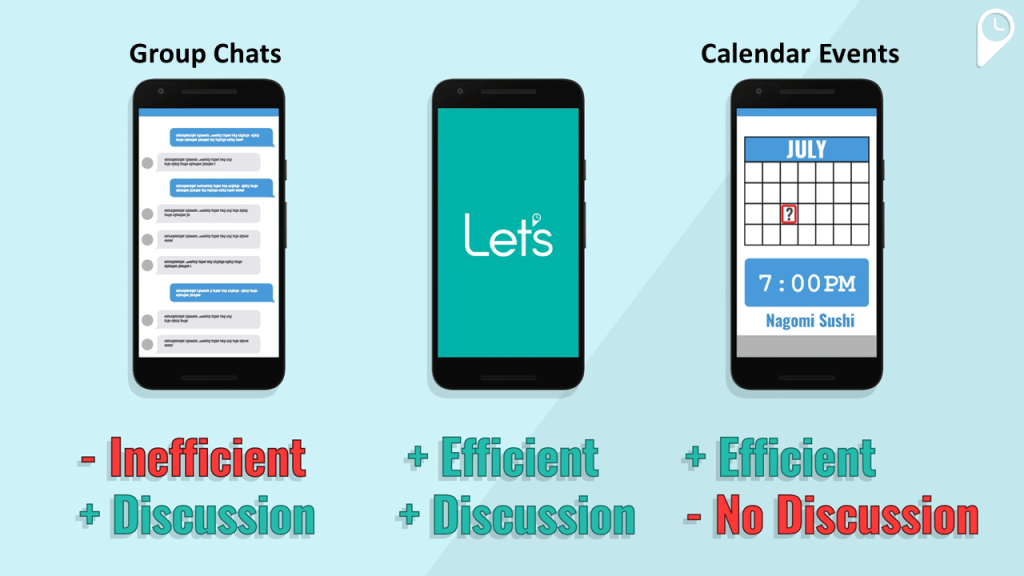
When positioning Let’s, our goal was to capture the efficiency of a calendar event with the flexibility of a group chat.
As a final note on tools, this is not the whole story: many diligent planners use documents and spreadsheets to make trade-offs and track polling.
Consensus is ideal
Ideally, to bring people together, you want consensus, that is, everyone agreeing on a time and place. If everyone agrees, it’s easy peasy. But how often does everyone agree on the first suggestion? There’s often a time conflict or multiple place options. Our system of suggestions and votes approximately captures this situation.
If not consensus, then make an informed decision
In practice, when there are many people involved, consensus is impossible. That is, some people have constraints that you simply must accept — and some of those constraints pose a hard conflict. You often accept a majority vote or you maximize those you consider a ‘must’. In this case, it helps to make an informed decision: how many people voted for what and who voted for what. Our UI gives you this visibility.
More than two dimensions
We say it’s two dimensions: time and place, but that is a bare minimum. In reality, you are often trading off more dimensions. Let’s look at some examples.
- In picking a restaurant, you want to check that a place has options to cover each person’s diet. You want to check that people are okay with the cuisine. You want to check that people are okay with the price / fanciness level. And, of course, it has to be available to seat your party at your time.
- In selecting a cabin for a recent trip, we traded off cost, amenities, accommodations, and views and we checked if it was pet friendly. The tricky element of cost was the more people who came, lowered the cost.
These added dimensions add complexity. Our minds are quite good at managing this complexity, but communicating it, polling it, and achieving consensus in a high dimensional space is not so easy. Our goal in Let’s is to ease this pain and reduce this complexity by visualizing it.
Clear information
If we’re going somewhere, send me a maps link
You know what I say: for a time, send a calendar invite and for a place, send me a maps link. If it’s on my calendar I can see it.
With a maps link, one click and I see it on a map, one more click and I can navigate there. If we’re going somewhere, I want a maps link first and foremost; I don’t want a name, an address, a screenshot — those require extra steps (remembering something or copying, switching apps, and pasting — better hope you don’t get interrupted). What I really want is all three: name, address, and maps link — which Let’s gives you.
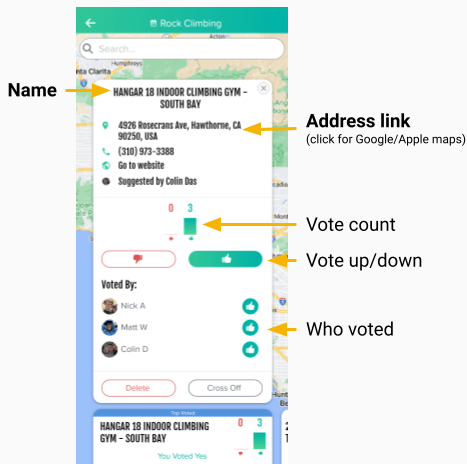
Places in Let’s have name, address, and maps links Beyond Events: Trips
Planning a trip is a level beyond an event as it comprises of many events and some macro decisions and alignment.
In the blue sky planning phase, you must find date ranges that work for everyone or at least have some overlap. You must agree on locations to visit and modes of transportation.
The epitome of a difficult trip to plan was a climbing trip I went on in 2017 to Moab with an experienced crew of climbers. We had people coming and going at different times, we shared cars, we shared tents, and we had to manage food. We also had different climbing abilities and a wild amount of climbing gear, so the people and gear had to be split because easier and harder climbs were in different locations. We did it, but it was a mess — and I’m committed to creating a better way to manage communication and resources during trips.
After planning is execution
Planning is one element. Execution is another.
- Whose car are we taking? Can we carpool? It depends, where are you going after this.
- Are you there? Exactly where are we meeting? Which table are you at?
For now, we have a group chat with every event. This is a subtle, but invaluable convenience. In a group SMS, when you add a new person, it generates a new chat. This is annoying and the new person loses the chat history. In Let’s this is quietly handled, like adding someone to a Slack channel.
Our direction is to move decision-making elements from the chat to the decision-making system. In that vein, we added General Polls, not limited to time or place. We’ve used those when virtually meeting to do workout videos, we voted on which video to do. We also added checklists which have been used for potlucks and camping supplies.
Still, there is much that can be improved to simplify the process and offload mental burden and chat.
Conclusion and moving forward
While group event planning is a problem, we get it done. Our goal is to make it easier, to reduce the steps involved for everyone while also trying to include everyone’s opinion, allowing everyone to be heard. We do this by creating a system — one with suggestions and voting — where information is constrained to be clear: with maps links for places and time zones automatically handled. And much more!
Single events are still a challenge with many dimensions: who is going in what car, exactly where are we meeting, dietary preferences, etc. After events, we’ll move onto trips, which is my ultimate goal.
I consider Let’s still in its MVP stage. And no matter the product, getting people to sign up and switch is tricky. As it grows in value, so does our user base. We hope you give it a shot and enjoy it. And we are open to your feedback.
Start using the app here!
-
Launch in 2020
Let’s quietly launched in 2020 to learn more about how people create events and how we can help.
We say “quietly” because often there is a big marketing campaign and celebration associated with a launch. But it was actually a small transition. We were already up and running, just in Beta apps, so it wasn’t on the market. You had to get it through a private invite.
Being a user on Beta was not easy. You had to give me your name and email and we register you and then you get a special link. So if getting an individual signed up was hard, getting a group to sign up was even harder.
That being said, we had some early adopter groups that were consistently creating events. And we learned from those first users.
However, being in a beta form prevented the app from spreading naturally. (You can’t ask your friend at a party to send their email to me, etc.) So, we “launched” which just meant publishing the beta apps. It didn’t seem like a big deal.
Before this point, we were an app: a mobile-only service. At launch, we also introduced our web app. This enabled people to use the Let’s service without installing it — and sadly, many people did not want to “install another app”.
We started as https://www.yeahlets.xyz/ but we changed it to https://www.yeahlets.com shortly after because Google Workspace enables you to get an email domain and a web domain with one purchase.
We are starting this blog a bit late. As of writing in 2023, we see that over the last three years, the number of confirmed events has increased. This is great news.

We have much more to share. So stay tuned.
Thanks,
Colin
 Let's Blog